
Quince: Luxury Essentials
QuinceShopping
4.3189.00 Reviews
- Version
- 1.261112.0
- Installs
- 100.00K
- Age Rating
- Everyone
Screenshots

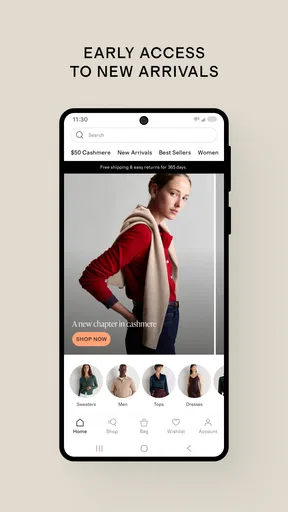
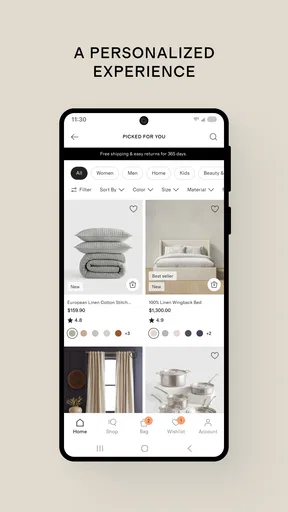
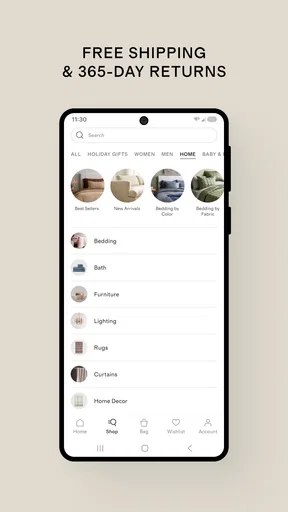
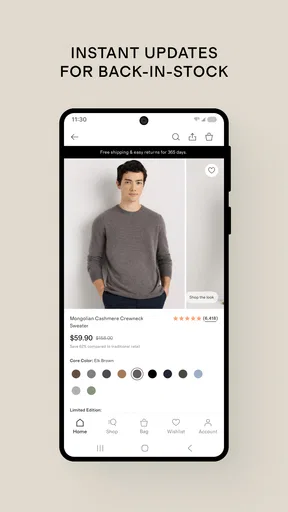


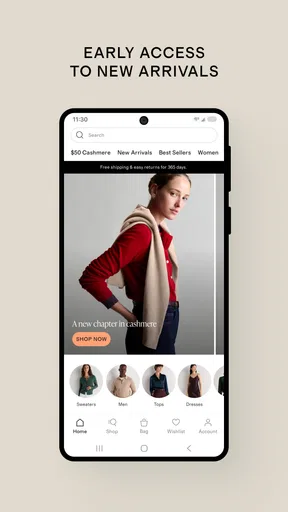
Our Review of Quince: Luxury Essentials
 Analysis by Appyee
I approached Quince: Luxury Essentials as a shopping app for people who want to browse apparel, home goods, and other everyday purchases without turning the experience into a research project. Its central appeal is simple: it brings the Quince catalog into a focused mobile storefront, with the developer Quince behind it and a free download for Android users.
After spending time moving through the catalog, opening product pages, comparing options, and returning to items I had already viewed, I found an app that feels more practical than flashy. It is aimed at shoppers who appreciate a clean path from discovery to decision, especially when they are looking for wardrobe basics or home essentials rather than hunting through an enormous marketplace.
How the shopping experience feels in everyday use
The first thing I noticed was how quickly the app communicates its purpose. There is no confusion about whether this is a social shopping tool, a resale marketplace, or a general retailer with thousands of unrelated sellers. The experience is centered on Quince’s own range, which makes browsing feel more deliberate than scrolling through a marketplace where every product competes for attention.
That focus is useful when I already have a category in mind. If I am looking for a sweater, a travel item, or something for the home, I can stay within the retailer’s catalog instead of filtering out unrelated sellers and inconsistent presentation. The trade-off is equally clear: shoppers who want the broadest possible selection, used items, or instant comparison across many brands will probably be more comfortable with a large marketplace or a conventional search engine.
The app is free, and its Everyone content rating makes it approachable for a household where different people may use the same device. It runs on Android starting with version 8.0, so it is not restricted to only recent phones. That wider compatibility is helpful, although the actual feel of the app will still depend on the age of the phone, available storage, and the quality of the connection.
Speed expectations when browsing
For normal shopping, I judge speed less by a stopwatch and more by whether the app interrupts my decision-making. Quince: Luxury Essentials generally fits that kind of use well: opening a category, scanning products, and moving into a detail page feels like a straightforward sequence rather than a complicated journey. The interface does not need to overwhelm me with extra layers before I can see what I came to inspect.
That does not mean every moment will feel instant. Product photography and detailed pages naturally place more demand on the connection than a simple list view. On an older phone or a weak mobile signal, image-heavy browsing can feel less fluid, particularly when I move quickly between several products. I would not treat that as a reason to avoid the app, but I would avoid making an important purchase while relying on an unstable connection.
A useful habit is to narrow my purpose before opening the app. Instead of launching it with the vague intention of “seeing what is available,” I get a better experience when I decide whether I am shopping for clothing, a home item, or a specific occasion. This reduces aimless scrolling and makes the app’s focused catalog work in its favor.
What happens during heavier shopping sessions
The more demanding scenario is not a single product lookup. It is a longer session in which I move through several categories, open many images, compare materials or colors, and repeatedly go back to earlier results. That pattern tests navigation, memory, and recovery more than a quick visit does.
In that situation, the app’s focused retail structure is useful because I am not also managing seller profiles, auction timers, or a stream of unrelated recommendations. I can keep my attention on the products themselves. Still, extended image browsing can make any shopping app feel heavier than it does during a short visit, especially on a phone with limited memory or many other apps open.
My practical advice is to treat the app as a decision tool rather than a background catalog. If I am comparing several possibilities, I make notes about the exact item, color, and size I am considering instead of assuming I will remember everything after a long session. That is a small workflow change, but it prevents the common problem of reopening the app later and having to reconstruct the entire search.
Another useful approach is to separate discovery from checkout. I can browse casually when I have time, then return with a clearer idea of what I actually need. This matters because mobile shopping encourages impulse decisions: a polished product image can make an item feel urgent even when it is only vaguely relevant. Quince works best for me when I use its convenience without letting the catalog dictate the pace.
Stability and recovering from interruptions
Reliability in a shopping app is about more than whether it opens. I also care about what happens when I receive a call, switch to another app, lose signal briefly, or accidentally back out of a page. A good session should be easy to resume without forcing me to repeat every step.
On a modern device with a steady connection, the experience is uncomplicated enough that returning to a product does not feel like work. The main recovery challenge is the same one found in many image-led retail apps: if a page has not fully loaded before the connection changes, I may need to wait or retry rather than continue seamlessly. That is a reasonable limitation of mobile shopping, but it is worth remembering before relying on the app during travel or in places with patchy coverage.
I also prefer to review my choices calmly before completing a purchase. If the app has been left open for a while, or if the phone has reclaimed memory by closing background processes, I would rather reopen the relevant product and verify the selection than assume an old screen still represents the current state. This is not dramatic friction, but it is a sound habit for any retail app.
The app’s rating is a positive signal: it holds a 4.7 average from around 650 ratings, with roughly 170 written reviews. I read that as evidence that many users are satisfied with the overall experience, while still leaving room for individual differences in device performance, network conditions, and shopping expectations. Its reach is also meaningful, with over 100K installs, so it is not an obscure experiment used by only a handful of people.
How demanding it is on a phone
I would describe the resource demands as moderate for a modern shopping application, with the main pressure coming from product images and longer browsing sessions rather than from complex interactive tools. A newer phone should have little trouble with ordinary use. On an older Android device, I would keep other demanding apps closed if I planned to compare many products in one sitting.
Storage is another practical consideration. The app itself is free to install, but the phone still needs enough available space for the application and its normal temporary data. If a device is already close to full, image-heavy apps can become less comfortable to use, regardless of the retailer. Clearing unused downloads and closing background processes may help more than changing any shopping setting.
Battery use should also be viewed in context. A short visit to check one item is very different from an extended session spent loading photographs and moving repeatedly between pages. I would not open the app for a long comparison session when the phone is nearly empty, particularly if I am away from a charger. That is sensible planning rather than a specific defect, but it affects how pleasant the experience feels.
The minimum Android requirement of 8.0 gives the app a reasonably broad device audience. Even so, compatibility does not guarantee identical performance across every supported phone. Screen size, memory, processor age, and the manufacturer’s background-app management can all influence how quickly pages appear and how well the app resumes after being left.
A realistic shopping scenario
Imagine I need a few versatile pieces before a trip and also want one practical addition for the bedroom. I would start with the apparel side of the catalog, inspect a small group of suitable items, and pay attention to the details that matter in real life: the available size, the color I can actually combine with what I own, and whether the item suits the climate and purpose of the trip.
Instead of adding the first attractive option, I would keep the shortlist small. Then I would switch to home products and look for something that solves a specific problem rather than browsing indefinitely. This is where the app’s single-retailer structure helps: I can move between apparel and home without changing shopping environments, but I still need personal discipline to prevent the convenience from becoming overbuying.
Before checkout, I would revisit each selected item and confirm the variant, quantity, and intended use. On a phone, it is easy to misread a color label or add a similar-looking product by mistake when moving quickly. The best benefit of the app is not that it removes every decision; it makes the useful decisions easier to organize.
Where it beats usual shopping alternatives
Compared with a broad marketplace, Quince: Luxury Essentials feels more curated. I do not have to evaluate as many different seller identities or inconsistent product pages. That can make a purchase feel less mentally expensive, particularly when I already trust the retailer’s general style and want to stay within its selection.
Compared with a physical store, the app is more convenient for browsing at an unusual hour, checking several categories without walking between departments, and revisiting an item after thinking about it. The downside is that a phone cannot replace the physical certainty of touching fabric, checking construction in person, or seeing the exact color under my own lighting.
Compared with a general brand website in a mobile browser, a dedicated app can feel more focused because it is built around repeated shopping visits rather than a wider web experience. However, a browser may be better when I want to compare several retailers side by side, share a product with someone who does not use the app, or avoid installing another application.
That distinction helps define the right audience. I would recommend this app to someone who already wants to shop Quince products and values a compact mobile storefront. I would be less likely to recommend it to a bargain hunter who needs live price comparison across many retailers, a shopper seeking secondhand goods, or anyone who insists on inspecting products physically before deciding.
Details that improve the way I use it
My first practical tip is to shop by purpose, not by mood. “Something nice” is too broad and encourages endless browsing. “A lightweight layer for commuting” or “a simple home item that replaces a worn-out one” gives the catalog a job to perform and makes it easier to stop when the right choice appears.
Second, I treat product photography as an invitation to investigate, not as proof that an item will suit me. I look closely at the written details and think about how the product fits my existing wardrobe or room. This is especially important for online apparel shopping, where the most attractive image may not answer the questions that matter after delivery.
Third, I avoid doing the final review during a rushed commute or while multitasking. A short pause to check the chosen variant and quantity is worthwhile. The app makes browsing convenient, but convenience can also make accidental selections easier if I tap through too quickly.
Finally, if the session becomes sluggish, I do not immediately assume the app is unstable. I check the connection, close unused apps, and reopen the product page if necessary. That simple recovery routine distinguishes a temporary phone or network issue from a persistent problem with the shopping experience.
Version, audience, and long-term practicality
The current Android version is 1.260804.1, and the app is presented as a free shopping application for everyone. For a reader deciding whether to try it, the important point is that there is no financial barrier to testing the browsing experience itself. The real commitment is attention: whether Quince’s selection matches what you buy often enough to justify keeping a dedicated shopping app installed.
The release date is Jan 16, 2026, which places the app in a relatively recent stage of its life. That can be encouraging for people who prefer current software, but it also means I would keep expectations realistic about how the experience may mature over time. A recent app can feel clean and focused while still benefiting from future refinements in navigation, recovery, and device optimization.
I would keep it installed if Quince is already one of my regular shopping destinations, especially because the catalog covers more than one part of daily life. If I only make a rare purchase, a browser visit may be more sensible and avoids adding another icon and another source of notifications to my phone.
My performance verdict
Quince: Luxury Essentials delivers its best experience during focused, ordinary shopping sessions: open the app, find a relevant category, inspect a manageable set of products, and make a considered decision. It feels more useful as a calm retail companion than as an endless entertainment feed, and that restraint is one of its strengths.
Its perceived speed should be good on a reasonably modern Android phone and stable connection, while older hardware or image-heavy sessions may introduce pauses. The app is not demanding because it performs complex tasks, but longer browsing still depends on the phone’s memory, battery, and network. Recovery from interruptions is manageable when I give pages time to load and verify my choices after returning.
My honest recommendation is to try it if you want a focused Quince shopping experience, not a universal marketplace. The 4.7 average and growing install base suggest that it is working well for many shoppers, while the limitations are mostly about fit: catalog breadth, physical inspection, comparison shopping, and the realities of mobile hardware. For the right user, it makes apparel and home browsing pleasantly direct; for everyone else, a browser or broader shopping service may remain the better tool.
Privacy and Permissions
See what permissions an app requests and how it handles your data.
- Photos/Media/Files
- read the contents of your USB storage, modify or delete the contents of your USB storage
- Storage
- read the contents of your USB storage, modify or delete the contents of your USB storage
- Camera
- take pictures and videos
- Microphone
- record audio
- Wi-Fi connection information
- view Wi-Fi connections
- Other
- view network connections, pair with Bluetooth devices, full network access, change your audio settings, run at startup, control vibration, prevent device from sleeping, Google Play license check
Verdict
Strengths of Quince: Luxury Essentials
- Premium clothing basics with a polished, minimalist look.
- Soft fabrics and comfortable fits suit everyday wear.
- Clear product photos make online shopping easier.
- Frequent promotions can offer strong value on luxury-inspired pieces.
- Easy to build coordinated outfits from a focused collection.
Limitations of Quince: Luxury Essentials
- Limited selection compared with larger fashion retailers.
- Sizing may vary between styles, so check measurements carefully.
- Some colors and sizes can sell out quickly.
- Online-only shopping makes fabric feel and fit hard to judge.
- Returns may be inconvenient if an item does not meet expectations.
Similar Picks in This Category
View All
SHEIN-Shopping Online
Roadget Business PTE. LTD.4.8

Amazon Shopping
Amazon Mobile LLC4.4


Mercado Libre: Compras online
Mercado Libre4.8

Wish: Shop and Save
Wish US Holdings LLC4.7

Alibaba.com - B2B marketplace
Alibaba Mobile4.4
Frequently Asked Questions
What is Quince: Luxury Essentials?
Quince: Luxury Essentials is a shopping app for browsing and purchasing clothing, accessories, home goods, and other everyday products positioned as affordable alternatives to luxury items. The app lets you explore collections, view product details, compare available colors and sizes, read customer reviews, save favorites, and place orders directly from an Android or iOS device. Product availability and delivery options may vary by location.
Are Quince products genuinely good quality?
Product quality can vary by category, material, and individual expectations, so it is worth checking the detailed descriptions before ordering. During browsing, pay close attention to fabric composition, dimensions, care instructions, photos, and verified customer feedback. Quince emphasizes materials and designs associated with premium products, but a lower price does not guarantee that every item will feel identical to a traditional luxury brand.
Does the Quince app offer free shipping and returns?
Quince is known for offering customer-friendly shipping and return policies on many products, but the exact terms can depend on the item, destination, and current policy. Before completing checkout, review the shipping estimate, fees, return window, refund method, and any product-specific exclusions. International orders may also involve additional delivery restrictions, taxes, or customs charges.
Is it safe to buy products through Quince: Luxury Essentials?
The app is designed for shopping through an established retail service and typically includes standard account, payment, order-tracking, and customer-support features. For safer purchases, download it from the official Google Play Store or Apple App Store, check that the developer information is correct, and avoid entering payment details through unofficial links. Use a strong password and keep the app updated.
Can I track orders and contact Quince customer support in the app?
After placing an order, users can generally access purchase information through their account, including order status, shipment updates, and available delivery details. The app or Quince website also provides ways to request help with sizing, returns, damaged items, cancellations, or delivery problems. Support availability and response times may vary, so keep your order number and confirmation email available when contacting the company.
